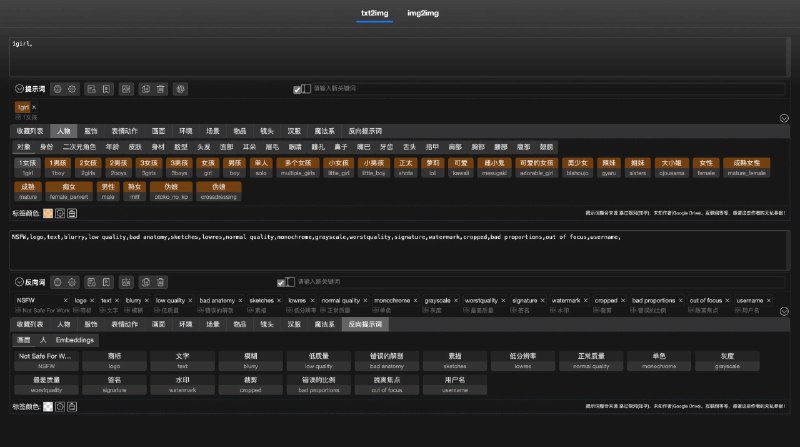
sd-webui提示词输入独立运行版
该项目是 sd-webui-prompt-all-in-one 的独立版本,它不需要依赖 stable-diffusion-webui 环境,即可在网页中编写和维护你的提示词。
项目地址:https://github.com/Physton/sd-webui-prompt-all-in-one-app
Windows 一键启动
1. 前往 Github Releases(https://github.com/Physton/sd-webui-prompt-all-in-one-app/releases),根据你的系统下载对应的压缩包。
- 夸克云盘:https://pan.quark.cn/s/962323a8f1e5
1. 解压压缩包,双击 startup-windows.bat 启动。
2. 第一次启动会自动安装依赖,需要等待一段时间。
3. 启动成功后,使用浏览器访问 http://localhost:17860
4. 如果需要修改端口、用户名、密码等配置,编辑 .sd-webui-prompt-all-in-one-app.env 文件即可。
如果你是中国大陆用户,可能因为网络原因无法正常安装依赖,可以尝试通过下面方法修改镜像源,然后再次运行 startup-windows.bat 启动。
1. 使用记事本编辑 startup-windows.bat 文件
2. 找到 pip install -r requirements.txt 这一行
3. 将其修改为 pip install -r…
📡发布:https://noisevip.cn/18038.html
🪧关注频道:@quanshoulu
💬频道社群:https://www.noisework.cn/qun/
📬投稿bot:@noisewowbot
📇搜索bot:@Efficiencysearchbot
🎁访问主页: www.noisework.cn
———————————————————————————
🎉💗①正规大流量手机卡渠道1:https://sourl.cn/KujjST
🎉💗②正规大流量手机卡渠道2:https://sourl.cn/M56NWF
🎉💗③夸克云盘内部合作方式:https://sourl.cn/teYqxt
